springboot-可重复读取请求body
沙福林 2023-04-20 00:05:28
springboot
request
可重复读取请求body
在SpringMVC中,一般的request对象,中的body一般只能读取一次,再次读取就空了,通过包装类的方式,转化原有对象,生成一个可重复读取的Request对象


# 参考文档
Spring Boot 接口加解密,新姿势! (opens new window)
# 1. 添加请求流多次读取类
package top.zlhy7.config;

import jakarta.servlet.ReadListener;
import jakarta.servlet.ServletInputStream;
import jakarta.servlet.http.HttpServletRequest;
import jakarta.servlet.http.HttpServletRequestWrapper;
import org.apache.tomcat.util.http.fileupload.IOUtils;

import java.io.BufferedReader;
import java.io.ByteArrayInputStream;
import java.io.ByteArrayOutputStream;
import java.io.IOException;
import java.io.InputStreamReader;

/**
 * @author shafulin
 * @date 2023/4/19 9:39
 * @description 请求流支持多次获取
 * 参考文档:https://mp.weixin.qq.com/s?__biz=MzI3ODcxMzQzMw==&mid=2247582237&idx=1&sn=55dde73d6fa87a5c2cec7d559df1ee4f&chksm=eb51072bdc268e3dc6827d7f6b299d46654ca6cfb3d5334e01e33bd997fcbae060f41674c407&mpshare=1&scene=1&srcid=04170MjxrcAqeubcSdWP0D46&sharer_sharetime=1681703068327&sharer_shareid=cb83a8a406e38d7526ca4f2fc44eeb13&key=93e34dd7a4c876e2a5c05cbc004181eb9e3b84aa43f37d6989e589feefc347e11375334c66f1b7b78e479dbf32f35015c24ac54fdb0bee687352cddb32137adbaae763b04e1d9701d98d5f6d082faab69bf17da51cbf75cfebaf7601d44528b8df16fe60becd6f6508243973e2b32799ac11815b1b3c35abbd7639d69648fa32&ascene=1&uin=MTMwMTQxOTA3Mg%3D%3D&devicetype=Windows+10+x64&version=63090217&lang=zh_CN&countrycode=CN&exportkey=n_ChQIAhIQWSG9aHYI5p3LdyxBRtV9URLqAQIE97dBBAEAAAAAAG8sDxnH8VIAAAAOpnltbLcz9gKNyK89dVj07Z13pBEITcyiYH8qDOx%2B5OrXsIu8V3PjBSe7EOcu3OrGa9wZhTIo9%2Bzl%2F59wPs%2B72EpzTUod2K2gx9FsXSThdQZZkEK0E20V3p7p4fZ84aBkiBwjsjMUx6XMy9ERsq25KZ8FGjYY48TjtFEBnINIAbJ8sSLqoB%2FowuCs096I424JDMheqgHE6nwYr1BkLaRaHmzIeS4FOuseGdCF0pzzqPUAoip3wkNxK8v5K%2BFKbkKTI%2BSi2HMfytzQIyk4MzfC%2BdUrlg%3D%3D&acctmode=0&pass_ticket=NlvpRmUeTQsJstpjatgV5QF%2FF31P2bL%2FL5bYVaJOstcsQa3bpEdt8FbbwHINZl24oWGdTi%2FFKvzpWGPZoX5bjQ%3D%3D&wx_header=1&fontgear=2
 */
public class InputStreamHttpServletRequestWrapper extends HttpServletRequestWrapper {

    /**
     * 用于缓存输入流
     */
    private ByteArrayOutputStream cachedBytes;

    public InputStreamHttpServletRequestWrapper(HttpServletRequest request) {
        super(request);
    }

    @Override
    public ServletInputStream getInputStream() throws IOException {
        if (cachedBytes == null) {
            // 首次获取流时,将流放入 缓存输入流 中
            cacheInputStream();
        }

        // 从 缓存输入流 中获取流并返回
        return new CachedServletInputStream(cachedBytes.toByteArray());
    }

    @Override
    public BufferedReader getReader() throws IOException {
        return new BufferedReader(new InputStreamReader(getInputStream()));
    }

    /**
     * 首次获取流时,将流放入 缓存输入流 中
     */
    private void cacheInputStream() throws IOException {
        // 缓存输入流以便多次读取。为了方便, 我使用 org.apache.commons IOUtils
        cachedBytes = new ByteArrayOutputStream();
        IOUtils.copy(super.getInputStream(), cachedBytes);
    }

    /**
     * 读取缓存的请求正文的输入流
     * <p>
     * 用于根据 缓存输入流 创建一个可返回的
     */
    public static class CachedServletInputStream extends ServletInputStream {

        private final ByteArrayInputStream input;

        public CachedServletInputStream(byte[] buf) {
            // 从缓存的请求正文创建一个新的输入流
            input = new ByteArrayInputStream(buf);
        }

        @Override
        public boolean isFinished() {
            return false;
        }

        @Override
        public boolean isReady() {
            return false;
        }

        @Override
        public void setReadListener(ReadListener listener) {

        }

        @Override
        public int read() throws IOException {
            return input.read();
        }
    }
}
1
2
3
4
5
6
7
8
9
10
11
12
13
14
15
16
17
18
19
20
21
22
23
24
25
26
27
28
29
30
31
32
33
34
35
36
37
38
39
40
41
42
43
44
45
46
47
48
49
50
51
52
53
54
55
56
57
58
59
60
61
62
63
64
65
66
67
68
69
70
71
72
73
74
75
76
77
78
79
80
81
82
83
84
85
86
87
88
89
90
91
2
3
4
5
6
7
8
9
10
11
12
13
14
15
16
17
18
19
20
21
22
23
24
25
26
27
28
29
30
31
32
33
34
35
36
37
38
39
40
41
42
43
44
45
46
47
48
49
50
51
52
53
54
55
56
57
58
59
60
61
62
63
64
65
66
67
68
69
70
71
72
73
74
75
76
77
78
79
80
81
82
83
84
85
86
87
88
89
90
91
# 2. 添加请求流转化过滤器
package top.zlhy7.config;

import jakarta.servlet.Filter;
import jakarta.servlet.FilterChain;
import jakarta.servlet.ServletException;
import jakarta.servlet.ServletRequest;
import jakarta.servlet.ServletResponse;
import jakarta.servlet.http.HttpServletRequest;
import org.springframework.core.annotation.Order;
import org.springframework.stereotype.Component;

import java.io.IOException;

import static org.springframework.core.Ordered.HIGHEST_PRECEDENCE;

/**
 * @author shafulin
 * @date 2023/4/19 9:41
 * @description 请求流转换为多次读取的请求流 过滤器
 * 参考文档:https://mp.weixin.qq.com/s?__biz=MzI3ODcxMzQzMw==&mid=2247582237&idx=1&sn=55dde73d6fa87a5c2cec7d559df1ee4f&chksm=eb51072bdc268e3dc6827d7f6b299d46654ca6cfb3d5334e01e33bd997fcbae060f41674c407&mpshare=1&scene=1&srcid=04170MjxrcAqeubcSdWP0D46&sharer_sharetime=1681703068327&sharer_shareid=cb83a8a406e38d7526ca4f2fc44eeb13&key=93e34dd7a4c876e2a5c05cbc004181eb9e3b84aa43f37d6989e589feefc347e11375334c66f1b7b78e479dbf32f35015c24ac54fdb0bee687352cddb32137adbaae763b04e1d9701d98d5f6d082faab69bf17da51cbf75cfebaf7601d44528b8df16fe60becd6f6508243973e2b32799ac11815b1b3c35abbd7639d69648fa32&ascene=1&uin=MTMwMTQxOTA3Mg%3D%3D&devicetype=Windows+10+x64&version=63090217&lang=zh_CN&countrycode=CN&exportkey=n_ChQIAhIQWSG9aHYI5p3LdyxBRtV9URLqAQIE97dBBAEAAAAAAG8sDxnH8VIAAAAOpnltbLcz9gKNyK89dVj07Z13pBEITcyiYH8qDOx%2B5OrXsIu8V3PjBSe7EOcu3OrGa9wZhTIo9%2Bzl%2F59wPs%2B72EpzTUod2K2gx9FsXSThdQZZkEK0E20V3p7p4fZ84aBkiBwjsjMUx6XMy9ERsq25KZ8FGjYY48TjtFEBnINIAbJ8sSLqoB%2FowuCs096I424JDMheqgHE6nwYr1BkLaRaHmzIeS4FOuseGdCF0pzzqPUAoip3wkNxK8v5K%2BFKbkKTI%2BSi2HMfytzQIyk4MzfC%2BdUrlg%3D%3D&acctmode=0&pass_ticket=NlvpRmUeTQsJstpjatgV5QF%2FF31P2bL%2FL5bYVaJOstcsQa3bpEdt8FbbwHINZl24oWGdTi%2FFKvzpWGPZoX5bjQ%3D%3D&wx_header=1&fontgear=2
 */
@Component
@Order(HIGHEST_PRECEDENCE + 1)  // 优先级最高
public class HttpServletRequestInputStreamFilter implements Filter {

    @Override
    public void doFilter(ServletRequest request, ServletResponse response, FilterChain chain) throws IOException, ServletException {

        // 转换为可以多次获取流的request
        HttpServletRequest httpServletRequest = (HttpServletRequest) request;
        InputStreamHttpServletRequestWrapper inputStreamHttpServletRequestWrapper = new InputStreamHttpServletRequestWrapper(httpServletRequest);

        // 放行
        chain.doFilter(inputStreamHttpServletRequestWrapper, response);
    }
}
1
2
3
4
5
6
7
8
9
10
11
12
13
14
15
16
17
18
19
20
21
22
23
24
25
26
27
28
29
30
31
32
33
34
35
36
2
3
4
5
6
7
8
9
10
11
12
13
14
15
16
17
18
19
20
21
22
23
24
25
26
27
28
29
30
31
32
33
34
35
36
# 3. 添加测试类
package top.zlhy7.controller;

import jakarta.servlet.ServletInputStream;
import jakarta.servlet.http.HttpServletRequest;
import lombok.extern.slf4j.Slf4j;
import org.springframework.web.bind.annotation.PostMapping;
import org.springframework.web.bind.annotation.RequestMapping;
import org.springframework.web.bind.annotation.RestController;

/**
 * @author renyong
 * @date 2023/4/18 19:42
 * @description 测试控制器
 */
@Slf4j
@RestController
@RequestMapping("/test")
public class TestController {
    /**
     * 测试
     */
    @PostMapping("test1")
    public void test1(HttpServletRequest request) throws Exception {
        ServletInputStream ris = request.getInputStream();
        StringBuilder content = new StringBuilder();
        byte[] b = new byte[1024];
        int lens = -1;
        while ((lens = ris.read(b)) > 0) {
            content.append(new String(b, 0, lens));
        }
        String strcont = content.toString();// 内容
        System.out.println(strcont);

        ris = request.getInputStream();
        content.setLength(0);
        b = new byte[1024];
        lens = -1;
        while ((lens = ris.read(b)) > 0) {
            content.append(new String(b, 0, lens));
        }
        strcont = content.toString();// 内容
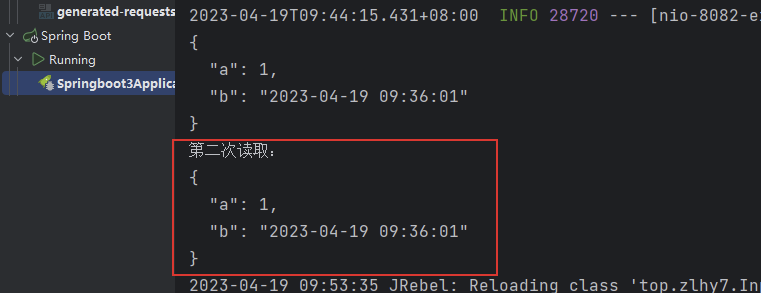
        System.out.println("第二次读取:\n"+strcont);
    }
}
1
2
3
4
5
6
7
8
9
10
11
12
13
14
15
16
17
18
19
20
21
22
23
24
25
26
27
28
29
30
31
32
33
34
35
36
37
38
39
40
41
42
43
44
2
3
4
5
6
7
8
9
10
11
12
13
14
15
16
17
18
19
20
21
22
23
24
25
26
27
28
29
30
31
32
33
34
35
36
37
38
39
40
41
42
43
44
请求接口
curl --location --request POST 'http://127.0.0.1:8080/test/test1' \
--header 'User-Agent: Apifox/1.0.0 (https://www.apifox.cn)' \
--header 'Content-Type: application/json' \
--data '{
    "a": 1,
    "b": "2023-04-19 09:36:01"
}'
1
2
3
4
5
6
7
2
3
4
5
6
7