idea-常用插件
插件的安装都是为了提高开发效率,虽然我的前辈们不屑一顾,记录自我常用插件,方便重新装机后能快速找到
- 前情提要
- 阿里自动部署工具 alibaba-cloud-toolkit
- 阿里编码规范检查 alibaba-java-coding-guidelines
- bug风险检查 SpotBugs
- 变量名转化 Camel Case
- 代码补齐 Codota
- 生成全属性setter方法 GenerateAllSetter
- 生成不重复序列号 GenerateSerialVersionUID
- 热部署 jrebel
- Java Bean to Json
- json美化 json helper
- 缩略图滚动条 CodeGlance
- 代码统计 Statistic
- 搜索maven坐标 maven search
- 超级玛丽进度条 Mario Progress Bar
- 小黑子进度条 ikun-progress
- 简化代码 lombok
- mapper与xml之间跳转 MybatisX
- 通义灵码
- CodeGeeX
- 接口请求 Cool Request
- 查看日志 Grep Console
- kill端口 KillPort
- Jar包编辑 JarEditor
# 前情提要
# 参考文档
目前我用的是 idea2022.2.3 本文提供的插件直链地址都是我在写该文档时的最新版,其他适用版本自行到插件详情页查看
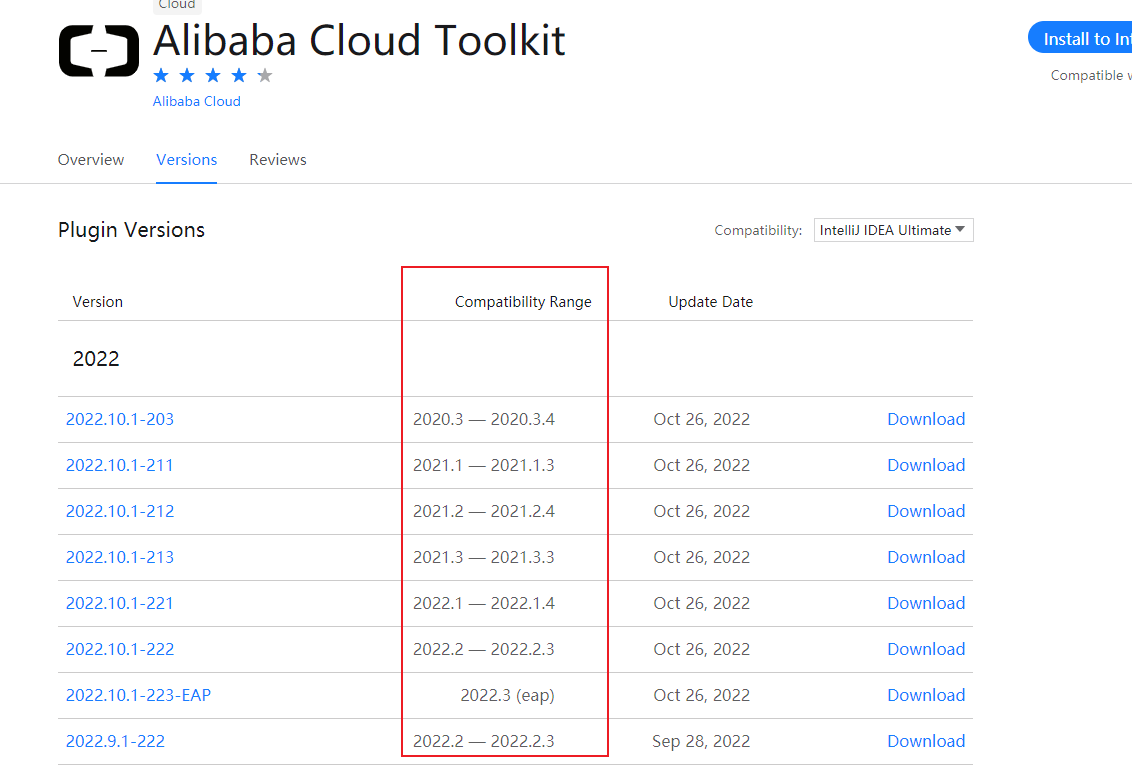
# 阿里自动部署工具 alibaba-cloud-toolkit
alibaba-cloud-toolkit (opens new window) | 直2023.12.1-232-233 (opens new window)
# 阿里编码规范检查 alibaba-java-coding-guidelines
必装插件系列,从业的第一年就开始不断规范自我编码
alibaba-java-coding-guidelines (opens new window) | 直2.1.1 (opens new window)
# bug风险检查 SpotBugs
SpotBugs (opens new window) | 1.2.5 (opens new window)
# 变量名转化 Camel Case
快捷键: alt + shift + u ,变量名可在驼峰,下划线,中划线,空格间隔 等变化使用
Camel Case (opens new window) | 直3.0.12 (opens new window)
# 代码补齐 Codota
Codota (opens new window) | 直4.2.10 (opens new window)
# 生成全属性setter方法 GenerateAllSetter
GenerateAllSetter (opens new window) | 直2.8.1 (opens new window)
# 生成不重复序列号 GenerateSerialVersionUID
GenerateSerialVersionUID (opens new window) | 直3.0.3 (opens new window)
# 热部署 jrebel
必装插件系列,避免反复多次重启项目,除非修改了配置文件,节省很多启动时间,jrebel-mybatis plus-extension 用于更新mybatis的xml修改
- jrebel-and-xrebel (opens new window) |
直2023.4.0 (opens new window) - jrebel-mybatisplus-extension (opens new window) |
直0.0.5 (opens new window)
# jrebel只因活
只因活教程
jrebel激活-在线激活
- 唯一值生成 (opens new window)
- 填写激活地址
- 在线激活1 https://jrebel.qekang.com/{唯一值}
- 在线激活2 http://jrebel.mnjblog.cn/{唯一值}
- 在线激活3 https://jrebel.com.cn/{唯一值} 邮箱填写
qfew0a@yahoo.com
# Java Bean to Json
Java Bean to Json (opens new window) | 直1.0.7 (opens new window)
# json美化 json helper
json helper (opens new window) | 直1.2.0 (opens new window)
# 缩略图滚动条 CodeGlance
CodeGlance (opens new window) | 直1.5.4 (opens new window)
# 代码统计 Statistic
Statistic (opens new window) | 直4.2.6 (opens new window)
# 搜索maven坐标 maven search
maven search (opens new window) | 直1.1 (opens new window)
# 超级玛丽进度条 Mario Progress Bar
Mario Progress Bar (opens new window) | 直1.7 (opens new window)
# 小黑子进度条 ikun-progress
ikun-progress (opens new window) | 直1.0.1 (opens new window)
# 简化代码 lombok
现在idea基本已经内置该插件了,基本不用单独安装了
lombok (opens new window) | 直0.34.1 (opens new window)
# mapper与xml之间跳转 MybatisX
MybatisX (opens new window) | 直1.5.5 (opens new window)
# 通义灵码
idea插件版chatGPT,使用帮助 (opens new window)
TONGYI Lingma (opens new window) | 直1.0.1 (opens new window)
# CodeGeeX
CodeGeeX是一款基于大模型的智能编程助手,它可以实现代码的生成与补全,自动为代码添加注释,不同编程语言的代码间实现互译以及针对技术和代码问题的智能问答功能。帮助开发者显著提高工作效率,CodeGeeX支持100+种编程语言,适配多种主流IDE平台,包括VSCode,JetBrains IDEs,Vim,HBuilderX,DeepIn-IDE等。
CodeGeeX (opens new window) | 直2.5.3 (opens new window)
# 接口请求 Cool Request
Cool Request是一款基于IDEA的HTTP调试工具,可以看成是轻量版的postman,它会自动扫描项目代码中所有API路径,按项目分组管理。一个类被定义为Controller且其中的方法被@RequestMapping或者@XXXMapping注解标注以后就会被扫描到。
cool request (opens new window) | 直2024.3.15 (opens new window)
# 查看日志 Grep Console
Grep Console可以自定义控制台输出格式,对控制台中不同级别的日志设置成不同的颜色。
Grep Console (opens new window) | 直12.25.0-IJ2023.3 (opens new window)
# 使用心得
个人输出日志时,一般头写上统一前缀,这样以便将过滤日志时,只保留需要的日志。
log.info("功能1-开始任务");
log.info("功能1-处理数据中");
log.info("功能1-处理完毕,耗时:{}",e);
2
3
# kill端口 KillPort
查杀端口插件,省的通过命令行查杀
- 打开插件(Open the plug-in)
- 输入端口(Input port)
- 点击搜索(Click Search)
- 右击搜索的结果(Right-click the search results)
- 结束选择的进程(End the selection process)
# Jar包编辑 JarEditor
无需解压,一键修改Jar包内文件,使用参考 (opens new window)